
How To Install Sump Pump With Battery Backup

Okay, let's talk sump pumps. I know, I know. Exciting stuff, right? Actually, yeah! Think of it as your home's personal water ninja, battling the rising tides. And a sump pump with a battery backup? That's a ninja with a spare throwing star!
We're diving into how to install one of these bad boys. Don't worry, it's not rocket surgery. It's more like… advanced plumbing Lego. With slightly wetter consequences if you mess up.
Why Bother with a Battery Backup?
Picture this: a raging storm. The power goes out. Your regular sump pump? Useless. Your basement? Turning into an indoor swimming pool. Not ideal for binge-watching Netflix. A battery backup is your insurance policy against power outages. It keeps that water ninja fighting, even when the lights are off.
Must Read
Fun fact: Did you know some sump pumps can pump over 2,000 gallons of water per hour? That's like draining a small swimming pool every 60 minutes!
Gear Up! Your Sump Pump Superhero Starter Kit
Before we get elbow-deep in sump sludge, let's gather our tools. Think of it as assembling your superhero utility belt.

You'll need:
- The Sump Pump with Battery Backup: Obviously. Read the reviews! Don't cheap out. This is your home we're talking about.
- A Sump Basin: The pump's cozy home. Make sure it's the right size.
- Piping: To send the water away. PVC pipe is your friend.
- Check Valve: Prevents water from flowing back into the pit. Like a one-way street for water.
- Drill: For making holes. Because sometimes, you need holes.
- Wrench: For tightening things. Untightened things are bad.
- Level: To ensure everything is… well, level. A slightly tilted pump is a sad pump.
- Safety Glasses: Protect those peepers! Sump pits aren't exactly known for their cleanliness.
- Gloves: Unless you enjoy the feeling of cold, slimy things on your hands.
Optional, but highly recommended: a good playlist. Plumbing to upbeat tunes is way more fun.
Step-by-Step: Unleashing Your Inner Plumber
Alright, let's get down to business. Remember to always turn off the power to the area before you start. We're dealing with water and electricity here. A shocking combination (pun intended).
- Prepare the Basin: If you're replacing an old pump, remove it (carefully!). Clean the basin. Nobody wants a pump living in filth.
- Install the Pump: Place the pump in the basin. Make sure it's sitting flat and secure. Don't let it wobble.
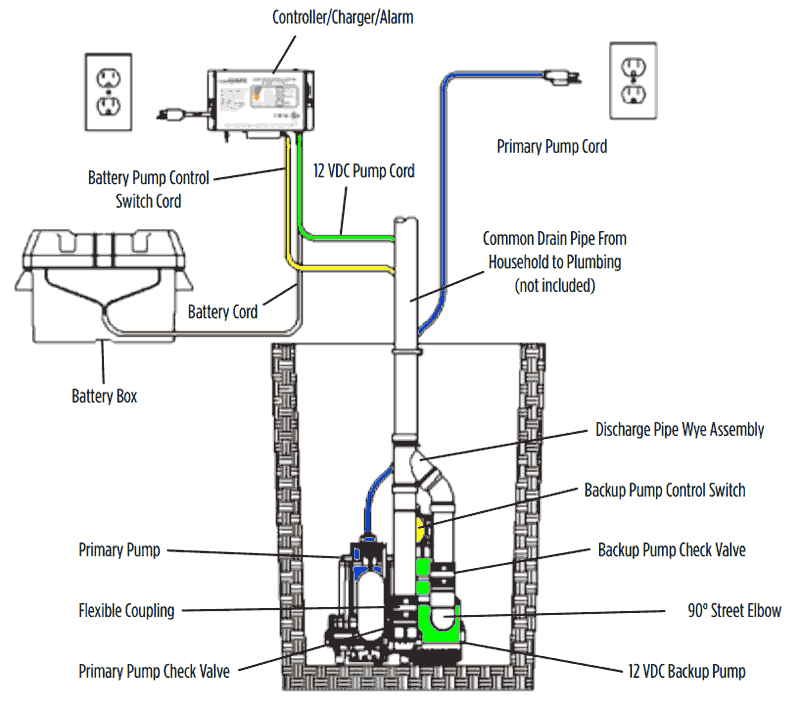
- Connect the Piping: Attach the PVC pipe to the pump. Use the check valve to prevent backflow. Think of it as a water traffic controller.
- Discharge the Water: Run the pipe outside, away from your foundation. You don't want to just move the water slightly.
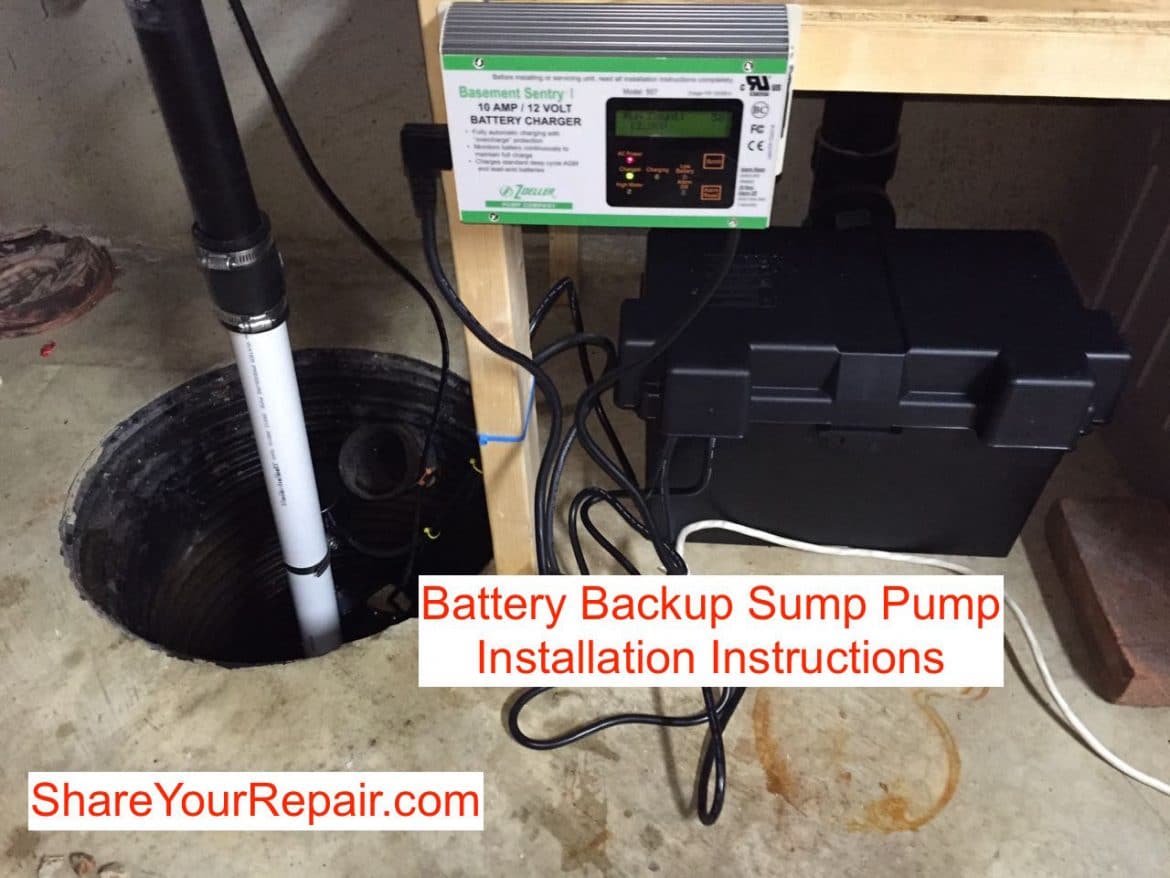
- Install the Battery Backup: Follow the manufacturer's instructions. This is crucial. Connect the battery and test the system. This ensures that in a time of power loss your pump will kick on!
- Test the System: Pour some water into the basin to activate the pump. Watch it work! Marvel at your plumbing prowess!
Pro Tip: Consider installing a sump pump alarm. It'll alert you if the pump fails or the water level gets too high. Think of it as a little electronic tattletale for your basement.
Troubleshooting: When Things Go… Wrong
Okay, sometimes things don't go according to plan. The pump might not turn on. The battery backup might fail. Don't panic! Here are a few common culprits:
- Float Switch Issues: The float switch tells the pump when to turn on. Make sure it's not stuck or obstructed. A stuck float switch is a sad float switch.
- Clogged Impeller: Debris can clog the impeller, the spinning part of the pump. Clean it out! Nobody likes a clogged impeller.
- Dead Battery: Check the battery! Is it charged? Is it old? Batteries don't last forever.
If you're stumped, don't be afraid to call a professional. Sometimes, it's better to leave it to the experts. Especially if you're starting to feel like you're drowning in sump pump problems. And if you do get a professional, remember to still ask questions! Knowledge is power. And in this case, water management.
The Joy of Dryness
Installing a sump pump with a battery backup might seem like a chore, but it's an investment in your home's health and your peace of mind. Think of it as a shield against the relentless forces of water. And let's be honest, a dry basement is a happy basement. And a happy basement means happy homeowners. So, get out there, embrace your inner plumber, and conquer those sump pump woes!
Now go forth, and keep your basement dry! You've got this.
