
How To Clean Battery Acid Off Of Electronics
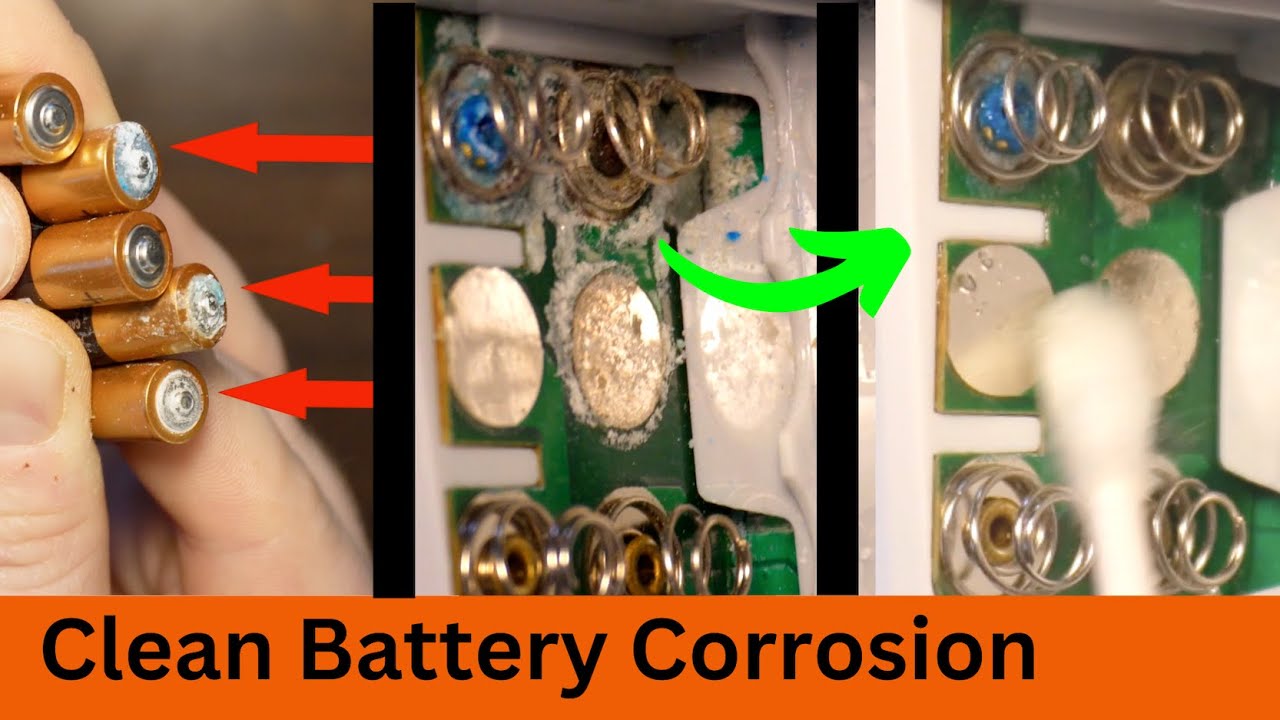
Okay, so battery acid. Not exactly the kind of "juice" you want anywhere near your precious gadgets, right? It's like the evil twin of electricity – one powers your phone, the other... well, lets just say it corrodes it. Nasty stuff.
But hey, accidents happen! Maybe a battery leaked in your remote, or your kid decided to dissect a defunct toy car (don't ask!). Whatever the reason, you're here because you've got a battery acid situation. Don't panic! We can handle this.
First Things First: Safety Dance!
Seriously, folks. Safety first! This isn't a suggestion, it's a must. We're talking about a corrosive substance here. You wouldn't lick a 9-volt (please tell me you wouldn't!), so don't treat battery acid casually.
Must Read
Grab some gloves. Latex, nitrile, whatever's handy. Think of yourself as a mad scientist, minus the crazy hair (unless you already have that, then embrace it!). Eye protection is also a good idea. Safety goggles? Sunglasses? Something to shield those peepers! And of course, work in a well-ventilated area. We don't want you accidentally inventing a new type of noxious gas.
Assess the Damage (and Your Sanity!)
Okay, deep breaths. Now, take a good look at the mess. How bad is it? Is it a tiny bit of leakage, or did a battery basically explode inside? (If it exploded, I'm both sorry and strangely impressed.) Is the acid on the outside of the device, or has it wormed its way inside the delicate electronic guts?

If the damage is extensive, especially inside a complex device like a phone or laptop, you might seriously consider whether it's worth the effort. Sometimes, the cost of repair (or the risk of making things worse) outweighs the value of the device. Just being honest here!
The Cleaning Arsenal: What You'll Need
Alright, ready to gear up? Here's what you'll want to have on hand:
:max_bytes(150000):strip_icc()/how-to-clean-battery-acid-safely-5112596-06-897968baae7749c383840d2a7e95e39e.JPG)
- Baking Soda: Our trusty friend, the neutralizer! Battery acid is an acid, so we need a base to counteract it. Baking soda to the rescue!
- Distilled Water: Tap water can contain minerals that could further damage electronics. Distilled is pure and innocent (well, as innocent as water can be!).
- Cotton Swabs/Q-tips: For precision cleaning in those tiny nooks and crannies.
- Soft Cloth or Paper Towels: For wiping up the mess.
- Isopropyl Alcohol (90% or higher): This helps to displace any remaining water and dry everything out quickly. Think of it as the final boss in the cleaning game!
- Small Brush (Optional): An old toothbrush works great for scrubbing away stubborn corrosion. Just make sure it's clean!
The Cleaning Process: Let's Get Scrubbing!
Now for the fun part (okay, maybe not "fun," but definitely satisfying once you're done!).
- Neutralize the Acid: Mix a small amount of baking soda with distilled water to create a paste. It should be thick enough to stick to the affected areas.
- Apply the Paste: Using a cotton swab or small brush, carefully apply the baking soda paste to the battery acid residue. You'll probably see some fizzing – that's the acid and baking soda reacting! Don't be alarmed; it's a good sign.
- Let it Sit: Let the paste sit for a few minutes to fully neutralize the acid. Maybe grab a sip of coffee while you wait? You deserve it.
- Wipe it Away: Use a damp (not soaking wet!) cloth or paper towel to gently wipe away the baking soda paste. Rinse the cloth frequently with distilled water.
- Alcohol Bath (Sort Of): Dip a cotton swab in isopropyl alcohol and carefully clean the affected areas again. This will help remove any remaining residue and speed up the drying process.
- Dry Time: Let the device air dry completely before attempting to use it again. This is crucial! You don't want to short-circuit anything. You can use a fan to speed things up. Patience, young Padawan!
Prevention is Key: Don't Let it Happen Again!
Once you've successfully rescued your device, let's talk prevention. Because who wants to do this again?

Remove batteries from devices you're not using for extended periods. Store batteries in a cool, dry place. And maybe, just maybe, consider investing in rechargeable batteries. They're better for the environment (and your wallet!).
So, there you have it! You've conquered battery acid! Now go forth and enjoy your (hopefully) fully functional electronics. You’ve earned it.
