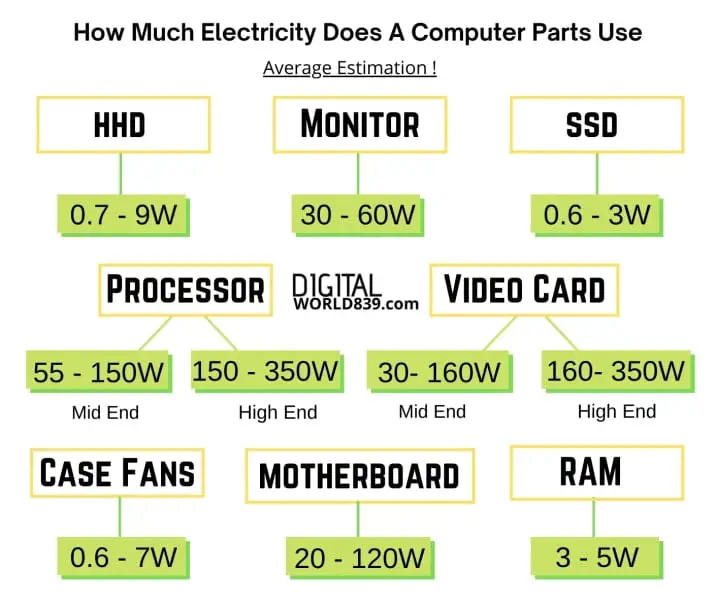
How Much Power Does A Desktop Computer Consume

Desktop computers! They're not just relics of a bygone era, stubbornly clinging on in a world obsessed with sleek laptops and pocket-sized tablets. In fact, the humble desktop is experiencing something of a renaissance, and for good reason. Beyond the serious business of spreadsheets and word processing, desktops are quietly powering some of the most exciting creative pursuits imaginable. But have you ever stopped to think about just how much power these digital dynamos are actually using?
For artists, hobbyists, and even casual learners, the desktop computer offers a distinct advantage: raw, unadulterated power. Think of a digital artist crafting intricate landscapes in Photoshop, a music producer layering dozens of tracks in Ableton, or a budding coder compiling complex algorithms. These tasks demand processing muscle, and a desktop, often with a dedicated graphics card and ample RAM, delivers it with impressive efficiency. It allows for smoother workflows, faster rendering times, and the ability to handle larger, more complex projects without frustrating lags or crashes. Plus, the upgradeability of a desktop means it can evolve with your skills, a serious benefit for anyone committed to long-term creative growth.
The creative possibilities are truly endless. Imagine painting hyperrealistic portraits with digital brushes, designing stunning 3D models for animation or 3D printing, composing orchestral scores with virtual instruments, or even creating immersive virtual reality experiences. You could be editing family videos into Hollywood-worthy productions, learning to code your own games, or exploring the vast world of digital art from abstract expressionism to photorealistic illustration. Consider creating intricate digital mandalas, generating unique AI-powered art pieces, or even designing your own custom fonts. The power of your desktop becomes the power of your imagination.
Must Read
So, how can you tap into this creative potential at home, without feeling guilty about the electricity bill? Here are a few tips. First, invest in energy-efficient components when building or upgrading your desktop. Look for power supplies with high efficiency ratings (80+ Bronze, Silver, Gold, etc.) and choose CPUs and GPUs that prioritize performance per watt. Secondly, monitor your usage. Many operating systems have built-in tools to track power consumption. Understanding which applications are the biggest energy hogs can help you adjust your workflow. Thirdly, unplug unnecessary peripherals when not in use. Printers, scanners, and external hard drives can still draw power even when idle. Finally, utilize power-saving modes. Configure your desktop to automatically enter sleep mode after a period of inactivity. These small changes can make a significant difference over time.
Ultimately, the joy of using a desktop for creative pursuits lies in its ability to empower you. It's a tool that removes barriers, unlocks potential, and allows you to bring your ideas to life. Whether you're sketching a whimsical character, composing a soulful melody, or building a virtual world from scratch, the desktop computer provides the muscle and flexibility to turn your vision into reality. It’s about the satisfaction of creating something beautiful, challenging, or meaningful – powered by a machine that is surprisingly efficient, adaptable, and inspiring. And that, in itself, is incredibly rewarding.


![Average Power Consumption by a Computer [1] | Download Scientific Diagram](https://www.researchgate.net/profile/Sonika_Saxena/publication/339842760/figure/fig1/AS:867811035475968@1583913682373/Average-Power-Consumption-by-a-Computer-1.png)