How Much Electricity Does A Laptop Computer Use

Okay, let's talk about your laptop. That sleek, portable, rectangular portal to… well, everything. You probably think about its processing power, its battery life, maybe even the satisfying click-clack of the keys. But have you ever pondered how much electricity this trusty companion sucks down?
The short answer? Not as much as you might think. Compared to your refrigerator, your air conditioner, or even that energy-guzzling vintage hairdryer your grandma insists on using, your laptop is practically a saint when it comes to energy consumption. It's like the responsible adult in a house full of teenagers leaving the lights on.
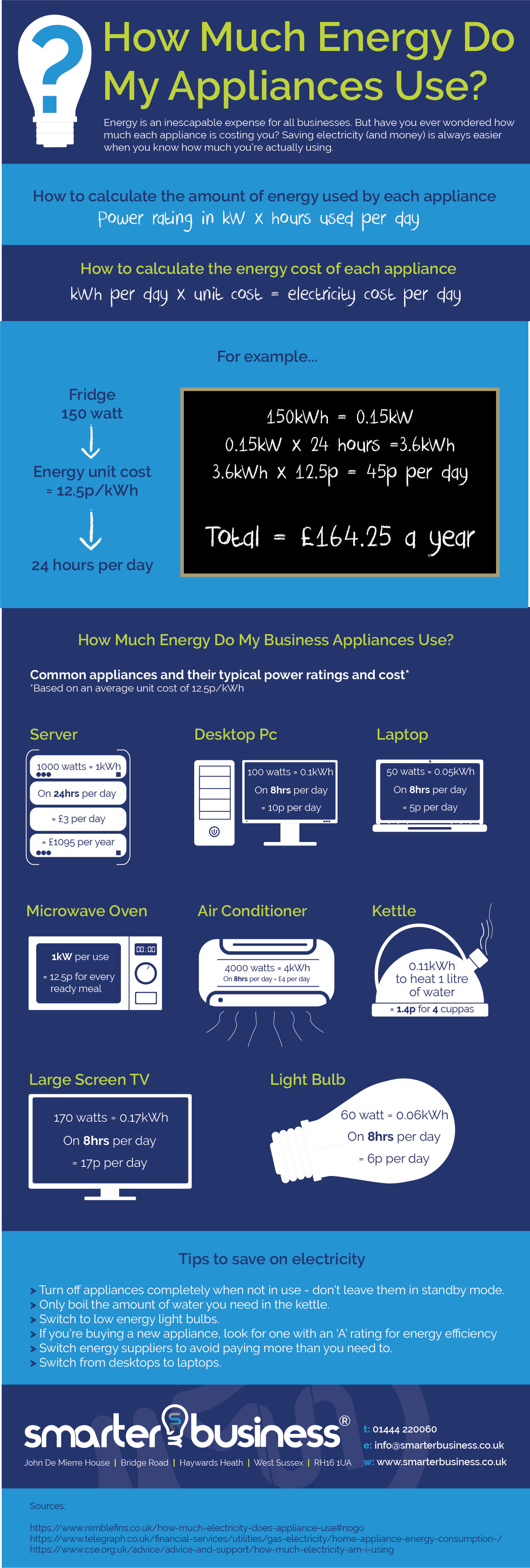
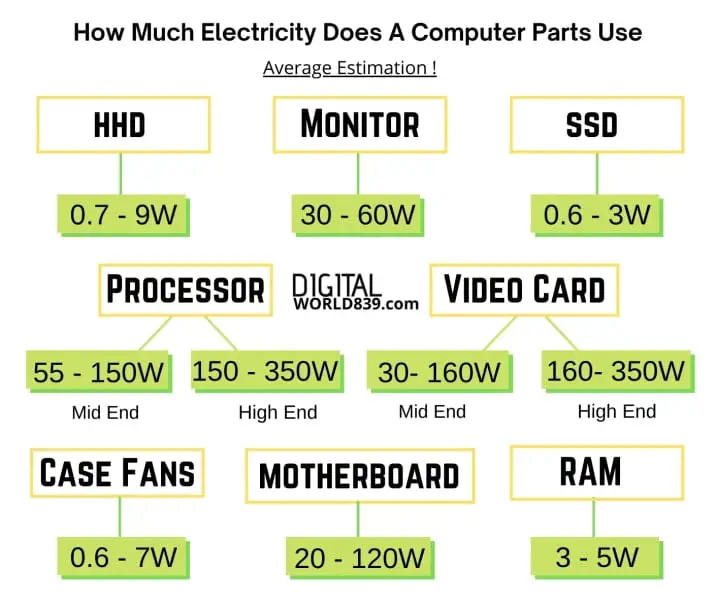
Let's get a little more specific, though. We’re talking, on average, somewhere between 20 to 50 watts when actively being used. A watt, by the way, is just a unit of power. Think of it like this: it’s the rate at which your laptop is chugging down electricity. The higher the wattage, the more it's slurping.
Must Read
Now, consider this: an old incandescent light bulb could use up to 60 watts. So, your laptop, the device you use to stream cat videos, write your novel, and pay your bills, often uses less power than a single, outdated light bulb. Feel a little smug? You should! You're practically saving the planet one meme at a time.
But wait! There’s a twist! The wattage your laptop uses isn't set in stone. It's a bit of a chameleon, changing based on what you're doing. If you're just word processing, you’re sipping energy. If you're running a graphically intense game or editing a blockbuster movie (go you!), your laptop is going to be working harder, and therefore using more electricity. Think of it like driving a car: cruising on the highway uses less gas than flooring it to pass someone.
Charging Up: The Power Brick's Secret Life
Let’s talk about that little brick that comes with your laptop – the power adapter. This seemingly innocuous device is responsible for converting the AC power from your wall outlet into the DC power your laptop craves. It’s like a translator, fluent in the language of electricity.
Here’s the kicker: even when your laptop is fully charged, and that little light on the power brick turns green, it’s still drawing a tiny bit of power. It’s called "phantom load" or "vampire power," because it’s like these devices are sucking energy out of the wall even when they're not actively doing anything. It's a miniscule amount, but it all adds up over time.
So, if you want to be a truly conscientious energy saver, unplug your laptop charger when you're not using it. It's like turning off the tap when you brush your teeth – a small act that can make a big difference. Plus, it's a great way to prevent those pesky phantom loads from draining your wallet and the planet's resources.

Laptop Size Matters (Sort Of)
Generally speaking, smaller laptops with less powerful components will use less energy than larger, more beefy models. Think of it like comparing a compact car to a gas-guzzling SUV. That tiny Chromebook you use for browsing the web? It's probably sipping power compared to your gaming laptop with a dedicated graphics card.
The Real Cost: More Than Just Watts
Ultimately, understanding your laptop's energy consumption is about more than just numbers. It’s about being aware of your impact. While your laptop might not be the biggest energy hog in your house, every little bit helps. Making small changes, like unplugging your charger or adjusting your screen brightness, can contribute to a more sustainable lifestyle.
Think of your laptop as a little digital pet. You wouldn't leave the water running for your dog all day, would you? Treat your laptop with the same respect, and you'll not only save a few watts, but you'll also feel good knowing you're doing your part for the environment. And who knows, maybe that saved energy will power the creation of even more cat videos. It's a win-win!
So next time you're curled up with your laptop, remember that it’s not just a machine; it’s a relatively energy-efficient friend, ready to connect you to the world. Just remember to unplug that charger!
Fun Fact: Did you know that the energy saved by turning off your computer and monitor at night can power a small town? Okay, maybe not a small town. But definitely a really, really big hamster wheel.
And one more thing: Don't forget to consider battery health. A well-maintained battery will be more efficient, drawing power only when needed. So treat your battery with love, and it will love you (and your electric bill) back!