
How Much Electricity Does A Computer Consume
Hey friend! Ever wonder how much juice your trusty computer is sucking down? You know, that glowing rectangle (or maybe a cool gaming tower) that's basically your window to the world? Well, grab a snack, and let's dive into the electric mysteries of your PC!
So, What's the Deal with Watts?
First things first, we need to talk about watts. Think of watts as the language of electricity. It's how we measure power. A lightbulb might use 60 watts, a microwave a whopping 1000 watts, and your computer… somewhere in between!
Now, the actual wattage of your computer depends on a few things. It's not a one-size-fits-all kinda situation. Just like you wouldn’t expect a tiny chihuahua to eat as much as a Great Dane (unless you're planning a really weird dog food competition), different computers have different energy needs.
Must Read
Desktop vs. Laptop: A Tale of Two Machines
Generally speaking, a desktop computer eats up more electricity than a laptop. Why? Because desktops tend to have beefier components: more powerful processors, dedicated graphics cards for gaming (or, let's be honest, cat videos in glorious HD), and more RAM. It's like comparing a sports car to a scooter. Both get you from A to B, but one uses a whole lot more fuel!
A typical desktop, when actively being used, might draw anywhere from 60 to 300 watts. Gaming rigs, especially those with multiple graphics cards and fancy liquid cooling (because, you know, looking cool is half the battle!), can easily soar to 500 watts or even higher! That's more power than some refrigerators use. Yikes!
Laptops, on the other hand, are designed for portability and efficiency. They usually sip power, using around 15 to 60 watts while in use. When idle or charging, they use even less. Think of them as the efficient little hummingbirds of the computer world.
What Impacts Power Consumption?
Okay, so we've got the general idea. But what specifically makes a computer use more or less power? Here are a few key culprits:
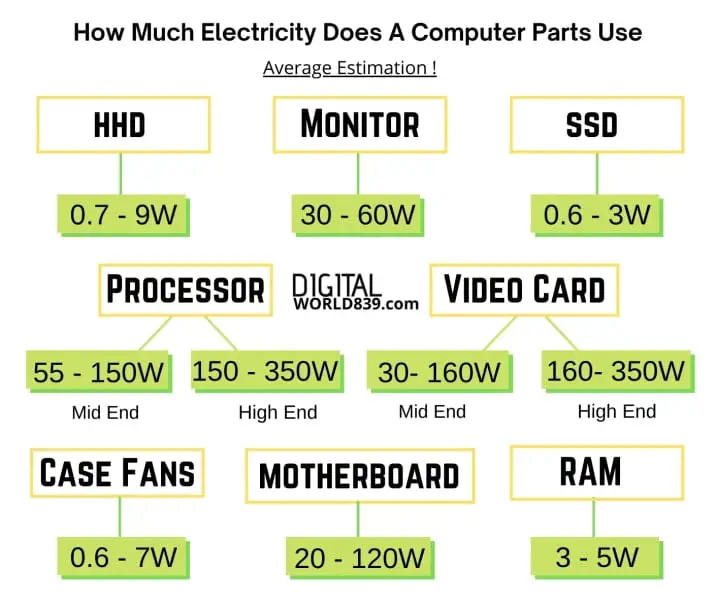
- The Processor (CPU): The brains of the operation! A more powerful processor, like an Intel Core i9 or an AMD Ryzen 9, will generally use more power than a less powerful one. Think of it as the engine size in that car analogy from earlier.
- The Graphics Card (GPU): This is especially important for gamers. A high-end graphics card is a power hog, but it's what makes those explosions look so darn good!
- RAM: More RAM means your computer can handle more tasks at once, but it also uses a bit more power.
- Hard Drives/SSDs: Solid state drives (SSDs) are generally more energy-efficient than traditional hard disk drives (HDDs).
- Peripherals: Everything you plug in – monitors, printers, speakers, fancy RGB keyboards that make you feel like you're in a spaceship – adds to the overall power draw.
Turning Off is Your Friend!
Here's a super-simple tip: turn off your computer when you're not using it! Seriously! Even putting it to sleep or hibernating helps. Leaving it on all the time is like leaving the lights on in every room of your house – a waste of energy (and money!). Plus, your computer deserves a break, too!
And don't forget about your monitor! Leaving it on after shutting down your computer is like ordering dessert after you're already full. Just...why?
Estimating Your Electricity Bill
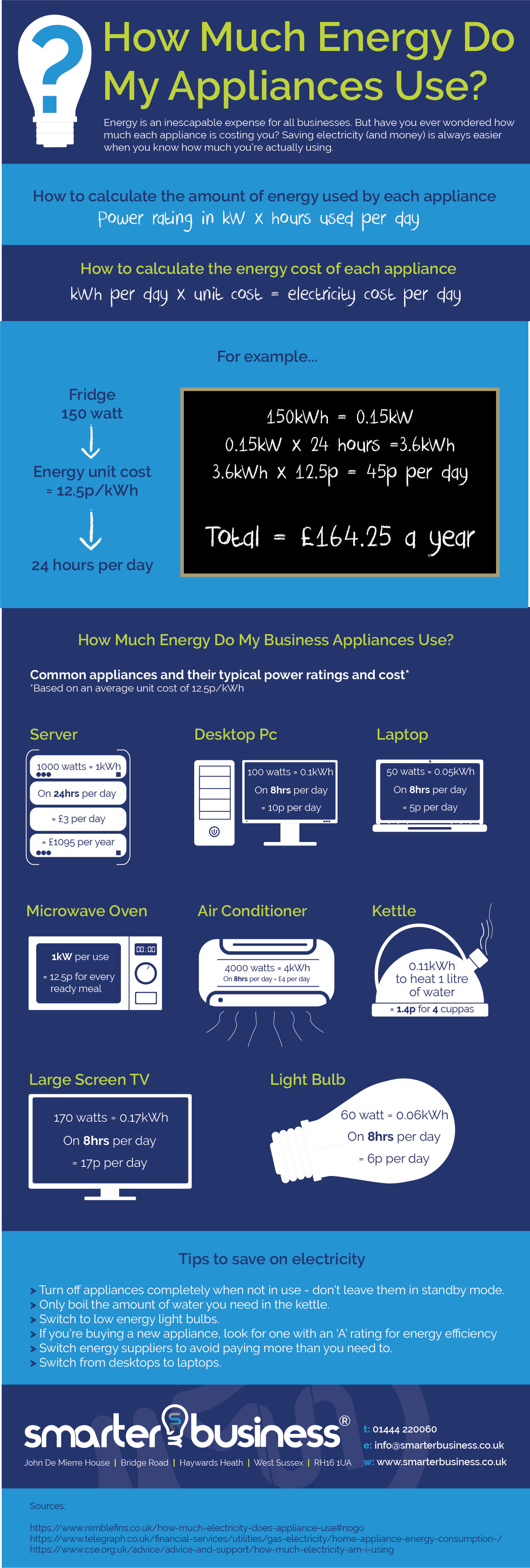
Want to get a rough idea of how much your computer is costing you? Here's a super-simplified way: find out the wattage of your computer (you can often find this on the power supply or in the computer's specifications). Then, multiply that wattage by the number of hours you use it each day. Then, multiply that by the number of days in a month. Finally, divide that by 1000 to get kilowatt-hours (kWh). Then, multiply that by the cost of electricity per kWh in your area (check your electricity bill!).

For example: Let's say your computer uses 150 watts, you use it for 4 hours a day, and electricity costs $0.15 per kWh. Your monthly cost would be roughly: (150 watts * 4 hours/day * 30 days/month) / 1000 * $0.15/kWh = $2.70. Not a fortune, but it adds up!
Remember, this is a very rough estimate. Your actual costs may vary.
The Uplifting Conclusion!
So, there you have it! The electric secrets of your computer, revealed! Hopefully, this gives you a better understanding of how much power your digital companion is using. And remember, even small changes, like turning off your computer when you're not using it, can make a difference. Plus, you’ll be doing your part for the planet, and saving a few bucks in the process. Now go forth and conquer the digital world… responsibly!
