
How Does Alexa Turn Lights On
There’s a certain kind of magic that happens when you utter, “Alexa, turn on the living room lights,” and just like that, your space illuminates. It feels straight out of a sci-fi movie, doesn't it? But trust us, it’s not sorcery; it’s a brilliant symphony of modern technology working seamlessly behind the scenes. Let's peel back the curtain and uncover how our beloved virtual assistant brings light into our lives, making our homes smarter and our lives a little easier.
The Invisible Dialogue: How Alexa Hears You
When you speak to your Echo device, you’re initiating a fascinating chain of events. First, the device records your voice command and sends it over your Wi-Fi network to Amazon’s secure servers in the cloud. Think of it as a super-fast, super-smart interpreter.
In the cloud, Amazon’s powerful artificial intelligence processes your speech, understanding not just the words, but also your intent. It deciphers, "Okay, she wants to turn on the lights, specifically in the living room." This entire process happens in mere milliseconds, making it feel instantaneous.
Must Read
Meet the Stars: Your Smart Lights
Before Alexa can do her thing, you need the right players: smart lights. These aren’t your grandma’s incandescent bulbs. Smart lights are equipped with tiny radios and processors that allow them to communicate. They come in various forms: individual bulbs, light strips, and even smart plugs that turn any lamp into a "smart" one.
Most smart lights connect in one of a few ways: directly via Wi-Fi (like many Wyze or TP-Link Kasa products), or through a dedicated hub using protocols like Zigbee or Z-Wave (common with Philips Hue or SmartThings).
The Bridge to Brilliance: Connecting Everything
Here’s where the "how" really comes into play. Once your voice command is processed in the cloud, Amazon’s servers send a signal back, but not directly to your light bulb. Instead, that signal is directed to the appropriate intermediary.
- If your lights are Wi-Fi enabled and connected directly to your home network, the signal goes straight from the cloud, through your router, to the individual light bulb.
- If your lights require a hub (like the Philips Hue Bridge), the cloud sends the signal to that hub, which then translates it into a language the lights understand (e.g., Zigbee) and sends it wirelessly to the bulbs. This is often more reliable for larger setups, as the hub creates its own dedicated network for your lights.
It’s a beautiful dance of digital communication, all orchestrated to simply make your room glow. It’s like having a miniature, highly efficient stage crew just for your lighting!

Getting Started: Your Smart Lighting Journey
Ready to jump into the luminous world of smart lighting? It’s easier than you think:
- Choose Your Lights: Decide on a brand and type. Start with a few bulbs in a main room to get a feel for it.
- Install the Companion App: Before linking to Alexa, download the specific app for your chosen smart lights (e.g., Hue app, Kasa app). Use this to initially set up and pair your bulbs or hub.
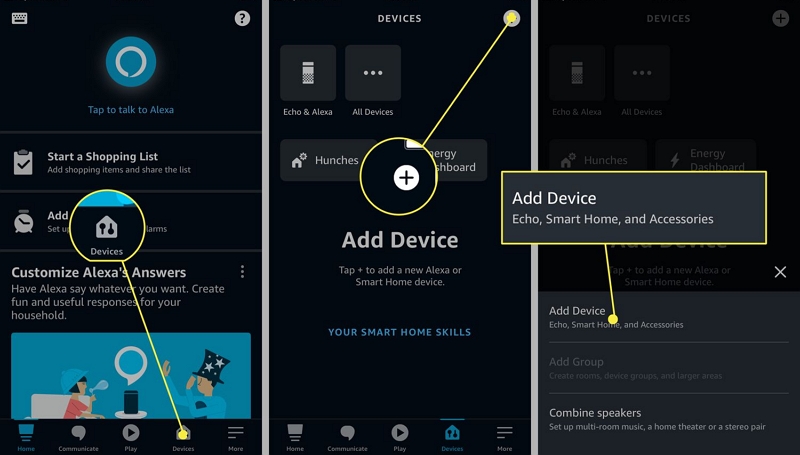
- Connect to Alexa: Open your Alexa app. Go to 'Devices', then the '+' icon, and 'Add Device'. Select the brand of your lights. Alexa will then "discover" them on your network. Voila! You're ready to command.
Fun Fact: While the idea of voice control for lights feels futuristic, the first patent for a voice-activated light switch was granted way back in 1968! It just took half a century for the tech to become affordable and reliable for our homes.
Beyond On/Off: Unlocking Smart Routines and Moods
The real fun begins when you move past just "on" and "off." Alexa allows for incredible customization:
- Routines: Create a "Good Morning" routine where Alexa turns on your bedroom lights gradually, plays your favorite news podcast, and even starts the coffee maker. Talk about waking up on the bright side!
- Scenes: Many smart light systems let you save specific lighting configurations as "scenes." Imagine telling Alexa, "Set Movie Night," and your lights dim to a cozy glow, perhaps even changing to a warm, cinematic hue.
- Color Control: With RGB smart bulbs, you can transform your room into a vibrant party space or a calming oasis. Just ask, "Alexa, change the living room lights to blue." Perfect for setting the mood for a quiet evening or a lively gathering.
Practical Tip: Always group your lights in the Alexa app (e.g., "Kitchen Lights," "Bedroom") for easier, more intuitive control.

A Little Troubleshooting & Pro Tips
Sometimes, technology can be a tad finicky. If your lights aren't responding:
- Check Wi-Fi: A stable Wi-Fi connection is paramount.
- Update Apps: Ensure both your Alexa app and your smart light's companion app are up to date.
- Restart: A quick power cycle of your Echo device, Wi-Fi router, or even the lights themselves can often resolve minor glitches.
Pro Tip: Give your smart lights unique, easy-to-remember names. "Alexa, turn on the reading lamp" is much clearer than "Alexa, turn on the lamp three."
The Everyday Magic
From fumbling for light switches in the dark to simply speaking a command, smart lighting controlled by Alexa has transformed our daily lives. It's not just about convenience; it’s about creating an atmosphere, enhancing safety, and even saving energy. It’s a subtle shift, but it profoundly changes how we interact with our living spaces, making them more intuitive, responsive, and, dare we say, magical. So go ahead, enjoy the effortless glow, and let Alexa light up your world, one voice command at a time.