How Do You Charge An Ipad Pencil
Alright, gather 'round, folks, grab a virtual cuppa! Let's talk about one of life's great modern mysteries, one that has undoubtedly stumped even the most tech-savvy among us: How in the heck do you charge an Apple Pencil? It sounds simple, right? It’s just a pencil! But oh no, my friends, Apple, in its infinite wisdom, has turned this seemingly mundane task into a multi-generational saga worthy of its own epic poem. Prepare yourselves, because we’re diving deep into the glorious, sometimes bewildering, world of Apple Pencil power-ups.
The Apple Pencil (1st Generation): The Awkward Teenage Years
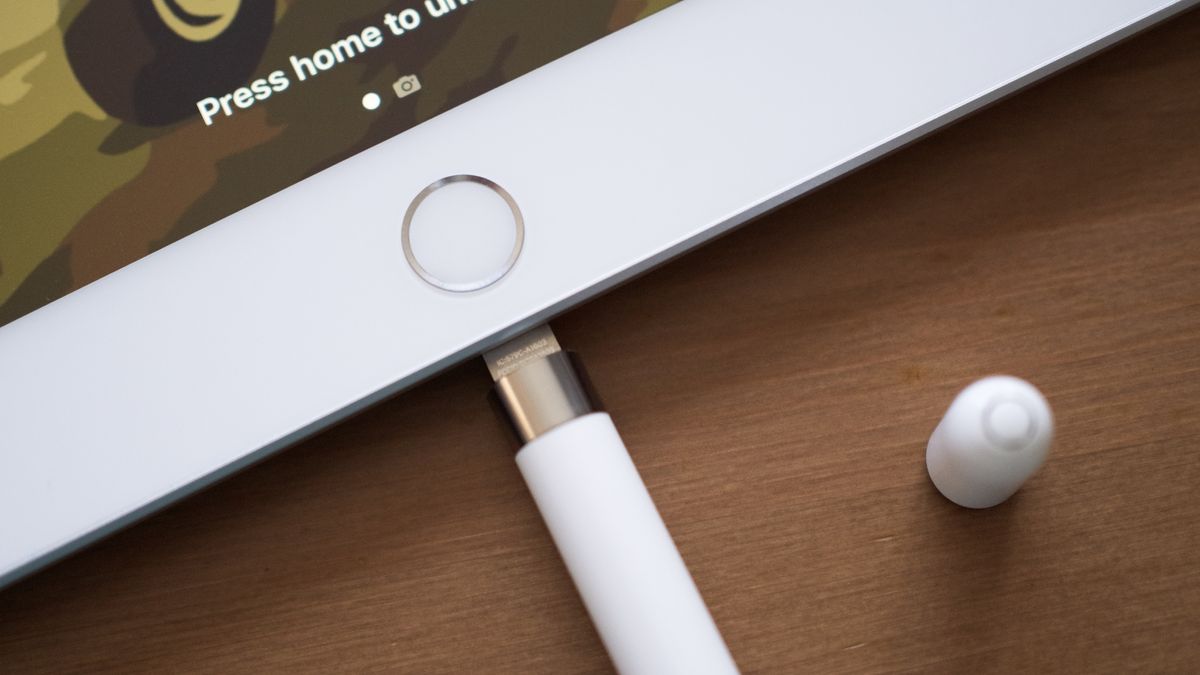
Let's kick things off with the OG, the granddaddy of them all: the first-generation Apple Pencil. Ah, what a time to be alive! You got this sleek, white stylus, and you were ready to unleash your inner Picasso. Then came the moment of truth: it died. Panic set in. You flipped it over, you shook it, you whispered sweet nothings to it. And then, you remembered the cap.
Yes, the cap. The little lid that seemed so innocent. You pull it off, and suddenly, you’re staring at a Lightning port. And what do you do with a Lightning port? You plug it directly into your iPad. Instantly, your beautiful, elegant Pencil transforms into a rather precarious, slightly ridiculous-looking tiny sword of power sticking out the side of your tablet. It's like a tiny, digital flagpole! The vulnerability! The sheer audacity of it all!
Must Read
I swear, the first time I did this, I felt like I was tempting fate. One clumsy elbow, one dramatic gesture, and poof! There goes my Pencil, snapped clean off, probably rolling under the couch to join the dust bunnies and forgotten dreams. Luckily, Apple also gave us a tiny adapter, a little connector that let you use a standard Lightning cable. So, you could charge it like a normal human being, just with an extra, easy-to-lose dongle. It was an ingenious solution to a self-created problem, a true testament to Apple's ability to keep us on our toes!
The Apple Pencil (2nd Generation): The Magnetic Revelation
Fast forward a few years, and Apple, perhaps having heard the collective gasps of terror from first-gen Pencil owners, graced us with the second-generation Apple Pencil. And with it came a revelation so simple, so elegant, it felt like pure tech magic. No more dangerous dangling. No more caps to lose in the sofa cushions.

This genius little stick of wonder charges by simply snapping onto the side of your iPad Pro or iPad Air. That’s it! A gentle magnetic thwack, and it just… sticks. And charges. It’s like it’s saying, "Don't worry, human, I've got this. Just put me where I belong." The first time I saw this, I actually clapped. Out loud. In a coffee shop. People stared. I didn't care. I was witnessing the evolution of charging, a true marvel of inductive wireless power.
It’s so intuitive, so seamless, you almost forget it needs charging until you see the little battery icon pop up. This is the Apple Pencil that made us all breathe a sigh of relief and wonder, "Why couldn't they have done this from the start?" Probably because they wanted us to appreciate this technological leap even more after the harrowing experience of the first gen. Clever, Apple. Very clever.
The Apple Pencil (USB-C): The Stealthy Newcomer
Just when you thought you had it all figured out, Apple threw another curveball with the Apple Pencil (USB-C). This one is like the mysterious, slightly understated cousin in the Pencil family. It doesn't have the magnetic charging of the second gen, nor the precarious Lightning plug of the first. Oh no, this one has a secret!
To charge this particular stylus, you need to slide back a little cap at the end – not remove it entirely, mind you, just slide it. And behold! A USB-C port is revealed. So, you just grab a standard USB-C cable (which, let’s be honest, you probably have a dozen of by now, thanks to all your other devices) and plug it in. No special adapters, no dramatic stances, just good old-fashioned cable charging. It even attaches magnetically to the side of your iPad for storage, though it won't charge that way. It’s practical, efficient, and surprisingly low-key for an Apple product.
It’s almost as if Apple listened to the complaints about the first gen's charging, simplified the second, and then said, "You know what? Let's give them a third option that’s just… normal." A round of applause for normalcy, folks!

So, Which One Do You Have? And How Do You Know It's Charging?
The key to charging your Apple Pencil, as you've probably gathered, is knowing which generation you own. Generally, if you have an older iPad (like an iPad Air 3rd gen or earlier non-Pro models), you likely have the 1st gen. If you have an iPad Pro, iPad Air 4th gen or later, or a recent iPad mini, you're probably rocking the 2nd gen. The USB-C model works with a wide range of iPads that have a USB-C port, including the 10th-generation iPad.
And how do you check if it's actually charging, or if you're just staring blankly at a dead stick? For all models, the easiest way is to glance at your iPad's screen. When you connect a 1st or 2nd gen Pencil, a battery status indicator usually pops up automatically for a few seconds. For the USB-C, you might need to check the Batteries widget on your iPad to see its charge level. Or, you know, just try to draw something. If it doesn't work, congratulations, you've likely joined the club of "my Pencil needs juice!"
So there you have it! The thrilling, occasionally baffling, and ultimately rewarding saga of charging the Apple Pencil. It’s a journey, not a destination. And honestly, isn’t that what makes tech so much fun? Now, if you’ll excuse me, my 2nd gen is looking a little low. Time for a magnetic thwack!