
How Do You Charge A Laptop Without A Charger
Oh no! You're staring at that dreaded low battery icon. Your laptop is about to go into hibernation, and you've misplaced, forgotten, or accidentally donated your charger to a museum of obsolete electronics. Don't panic!
We've all been there. It feels like the end of the world, right? But fear not, my friend, for I'm about to unveil some… unconventional… methods to breathe life back into your digital companion. Prepare for some seriously MacGyver-esque solutions.
Power Bank to the Rescue!
First, let's talk about the obvious, but often overlooked, superhero: the power bank! Yes, that little brick you usually use for your phone might just be the savior of your laptop-using day.
Must Read
Make sure it has a high enough power output and the right connector. Not all power banks are created equal, some are designed for phones and other smaller devices.
Check the specs on your power bank and laptop, and you might be back in business faster than you can say, "Where did I leave that darn charger?!"
USB-C to the Rescue (Again!)
Ah, USB-C, the champion of modern connectivity. If your laptop is relatively new, there's a good chance it charges via USB-C. That's fantastic news!
Because that means you can borrow a charger from pretty much anyone with a modern phone or tablet. Just ask nicely!
It might charge a bit slower than your regular charger, but hey, beggars can't be choosers, right? And more importantly, you will be online!
The Universal Laptop Charger: A Gamble Worth Taking?
Behold, the universal laptop charger! It's like the Swiss Army knife of power adapters, boasting a collection of interchangeable tips to fit various laptop models.
This might seem like the perfect solution, a one-size-fits-all power panacea. But caution! Like that questionable gas station sushi, proceed with care.
Make sure the voltage and amperage match your laptop's requirements. Otherwise, you could be facing a digital disaster of epic proportions, which is why this might not be the best option.
Car Charger Chaos (But Potentially Useful!)
Stuck on a road trip with a dying laptop and a looming deadline? Your car's cigarette lighter (or, more likely, a USB port) might be your unlikely ally.
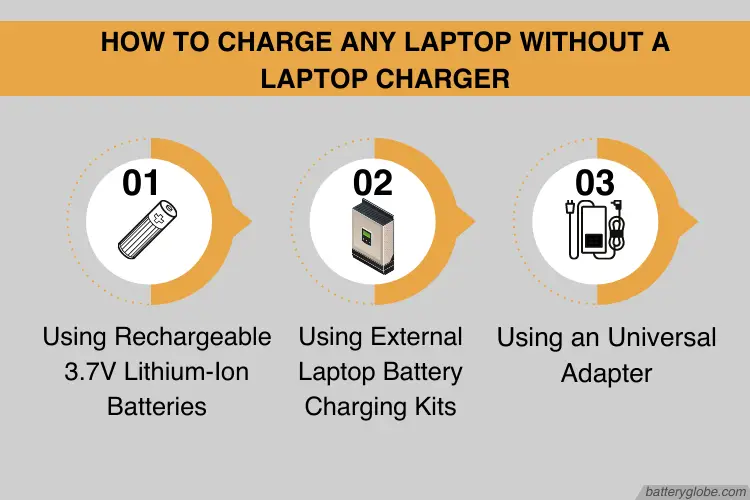
You'll need a car laptop charger, of course, which plugs into your car's power outlet. Again, ensure compatibility with your laptop's voltage and amperage.
Just remember to keep the engine running, or you might end up with a dead car battery and a dead laptop. That would be a double whammy of digital despair!
The Art of the Power Nap (For Your Laptop)
Sometimes, the best solution isn't about finding a new power source, but about conserving the power you already have. Think of it as laptop energy management.
Close unnecessary programs, dim the screen brightness, and turn off Wi-Fi and Bluetooth. Basically, put your laptop into a deep, meditative state.
Every little bit helps, buying you precious minutes (or even hours!) until you can find a legitimate power outlet. Your laptop will thank you for it!
Borrowing (or Begging) for Power
Desperate times call for desperate measures. Time to unleash your inner social butterfly and politely (or not-so-politely) inquire with your neighbors, classmates, or that friendly barista.
Offer them a virtual high-five, a baked good (if you have any), or your undying gratitude in exchange for a few minutes of charging time.
Remember, a little charm can go a long way. And who knows, you might even make a new friend in the process (a friend with a charger, that is!).
The Solar Power Gambit
Feeling adventurous? Got access to sunshine? A solar charger could be your eco-friendly savior. These handy devices convert sunlight into electrical power.
They're usually designed for charging phones and smaller gadgets. But, if you have a powerful enough solar charger, it might be able to give your laptop a slow but steady charge.

Just be prepared to wait a while. And pray for clear skies. After all, the sun is a fickle mistress.
Understanding Voltage and Amperage: The Unsung Heroes
Before you go plugging your laptop into just any old power source, it's crucial to understand the concepts of voltage and amperage. Think of them as the language of electricity.
Voltage is the electrical "pressure," while amperage is the electrical "current." Your laptop needs a specific voltage and amperage to charge safely and effectively.
You can usually find this information on your laptop's charger or on a sticker on the laptop itself. Mismatched voltage or amperage can lead to damage or, in extreme cases, a fire hazard.
The Docking Station Option
A docking station, often used in office settings, can sometimes provide power to your laptop. These devices connect to your laptop and offer additional ports and functionalities.
Check if your laptop is compatible with a docking station that provides power delivery. It's a convenient way to charge and expand your laptop's capabilities at the same time.
Think of it as giving your laptop a super-powered home base, a place where it can recharge and connect to all its favorite peripherals.
DIY Charger (Use with Extreme Caution!)
I'm including this for informational purposes only, and I strongly advise against attempting it unless you have a solid understanding of electronics and a healthy disregard for your own safety. Ahem.
Building a DIY charger involves splicing wires, messing with electrical components, and potentially electrocuting yourself. It's like playing Russian roulette with electricity.
Seriously, don't do it. Unless you're an electrical engineering genius with a death wish. There are much safer (and saner) ways to charge your laptop.
Avoiding Future Charger Catastrophes
The best way to charge your laptop without a charger is, of course, to not need to in the first place! Prevention is key.
Invest in a spare charger. Keep one at home, one at work, and one in your travel bag. Think of them as insurance policies against charger-related emergencies.
And for goodness sake, keep track of your original charger! Attach a Tile tracker to it, or simply designate a specific spot for it and always put it back there. Your future self will thank you.
The "Airplane Mode" Trick
Speaking of conserving power, enable airplane mode. This turns off all wireless communication, significantly reducing battery drain.
It's like putting your laptop into a sensory deprivation tank, cutting off all distractions and allowing it to focus on the task at hand (or, more likely, the lack thereof).
Use it judiciously, especially when you're not actively using Wi-Fi or Bluetooth. Your battery life will thank you!
External Battery Packs (Designed for Laptops)
While I mentioned power banks earlier, there are also external battery packs specifically designed for laptops. These are larger and more powerful than your average phone charger.
They can provide a significant boost to your laptop's battery life, allowing you to work (or play) for hours on end without needing a wall outlet.
It's like giving your laptop a portable energy reservoir, a backup power supply for those times when you're off the grid.
Check the Ports
Sometimes the problem isn't the charger, it's the port! Dust, debris, and even bent pins can prevent your laptop from charging properly.

Carefully inspect the charging port on your laptop for any obstructions. Use a can of compressed air to blow out any dust or debris.
If you suspect a bent pin, resist the urge to poke around with a paperclip. Seek professional help! You could end up doing more harm than good.
Adjusting Power Settings
Dive into your laptop's power settings. You can often customize how your laptop uses power, optimizing it for battery life rather than performance.
Lower screen brightness, disable background apps, and adjust sleep settings to minimize power consumption. Every little tweak counts!
Think of it as fine-tuning your laptop's energy efficiency, squeezing every last drop of power out of that precious battery.
Consider a New Battery
If your laptop battery is old and worn out, it might be time for a replacement. Batteries degrade over time, losing their capacity to hold a charge.
A new battery can breathe new life into your laptop, giving you significantly longer runtimes. It's like giving your laptop a rejuvenating spa treatment.
Just make sure to choose a reputable brand and a battery that's compatible with your laptop model. You don't want to end up with a dud.
So, there you have it! A cornucopia of creative (and sometimes questionable) methods for charging your laptop without a charger. Remember to prioritize safety and exercise caution.
Now go forth and conquer the world, armed with your newfound knowledge and a healthy dose of resourcefulness. And maybe, just maybe, remember to pack your charger next time!