
How Do I Charge My Laptop Without A Charger

Oh no! Disaster strikes! Your laptop battery is blinking red like a tiny, angry demon and your charger has vanished. Don't panic! We've all been there, staring into the abyss of impending digital darkness.
The Universal Savior: USB-C to the Rescue!
First, check if your laptop has a USB-C port. This little marvel is becoming the superhero of charging. Many newer laptops can actually charge via their USB-C port, just like your phone!
Grab your phone charger! If it's a USB-C Power Delivery (PD) charger, plug it in. It might just work!
Must Read
Think of it as giving your laptop a tiny sip of your phone's life juice. It might not be a super-fast charge, but it could be enough to get you out of a jam.
Lower Your Expectations (and Your Screen Brightness)
Imagine your laptop is a thirsty race car, and you're trying to fill its tank with a garden hose. It's going to take a while! To help things along, dim your screen brightness.
Also, close any unnecessary programs. Every little bit helps! The less your laptop is working, the less power it's guzzling.
Think of it as putting your laptop on a digital diet. A power-saving diet, that is!
Borrow a Friend's Charger (Operation: Charger Retrieval)
Time to call in the reinforcements! Hit up your friends, family, or even that friendly-looking person at the coffee shop. Beg, borrow, or… well, just borrow! Ask if they have a compatible charger.
Explain your dire situation! People are usually understanding, especially if you promise to return it ASAP (and maybe buy them a coffee as a thank you!).
This is "Operation: Charger Retrieval" in full swing. Good luck, agent!
The Power Bank Play: Portable Power to the Rescue
Do you have a massive power bank, the kind that could probably jump-start a car? If so, you might be in luck! Some high-capacity power banks can charge laptops, especially if they have USB-C PD output.
This is like having a mini power plant in your backpack. Perfect for emergencies!
Just make sure your power bank has enough juice to actually make a difference. A tiny power bank won't do much more than taunt your dying laptop.
Universal Laptop Chargers: The Adaptable Solution
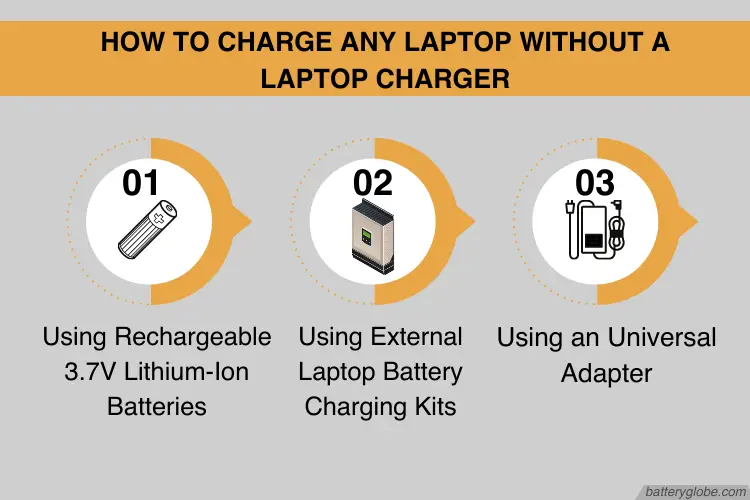
Consider investing in a universal laptop charger. These handy devices come with multiple tips that fit a wide range of laptop models. Think of it as a Swiss Army knife for laptop charging!
Keep one in your car or your emergency kit. You'll be the hero of the coffee shop next time someone forgets their charger.
Plus, it saves you from having to remember which specific charger goes with which laptop. One charger to rule them all!
Car Charger Conversion: Road Trip Ready
Spending a lot of time in your car? Get a car charger that can power your laptop! Many car chargers have USB ports or even AC outlets, allowing you to plug in your regular laptop charger.
This is especially useful for long road trips or when you're working on the go. Just be mindful of your car battery!
Don't drain your car battery so much that you can't start the engine! A jump start will definitely put a damper on your productivity.

Low Power Mode: The Art of Stretching Every Last Drop
Enable your laptop's low power mode. This will drastically reduce power consumption by limiting CPU speed, dimming the screen, and turning off unnecessary features.
It's like putting your laptop in hibernation mode, but without actually hibernating. It's still awake, just really sleepy.
Think of it as the digital equivalent of living on ramen noodles to save money. It's not glamorous, but it works in a pinch!
Airplane Mode: Disconnect to Reconnect (to Power)
Turn on airplane mode! This disables Wi-Fi and Bluetooth, which can be significant power drainers. You might not be able to browse the internet, but at least your laptop will stay alive a little longer.
It's a digital detox, forced upon you by your dying battery. Embrace the silence!
Use this time to actually think, read a book, or, you know, talk to people in real life. Shocking, I know!
External Battery Pack: A DIY Charger Solution
This is a bit of a MacGyver-esque solution, but if you're desperate, you can try building your own external battery pack. This involves connecting multiple batteries in series or parallel to achieve the desired voltage and capacity.
Warning: This is only for experienced DIYers with a good understanding of electronics. Messing with batteries can be dangerous! Seriously, don't electrocute yourself.

If you're not comfortable with electronics, skip this one entirely. It's better to have a dead laptop than to become a human lightning rod.
Avoid Power-Hungry Tasks: Simple is Key
Don't try to render a 4K video or play a graphics-intensive game when your battery is low. Stick to simple tasks like writing documents or browsing text-based websites.
This is not the time to show off your gaming skills. Save the epic battles for when you have a reliable power source.
Think of it as driving a car on fumes. You're not going to win any races, but you might just make it to the gas station.
Adjust Your Power Settings: Fine-Tune for Survival
Dive into your laptop's power settings and customize them to maximize battery life. Reduce the screen timeout, disable background apps, and adjust the processor power management.
This is like giving your laptop a performance review and telling it to be more efficient. "Less Netflix, more productivity!"
Every little tweak can make a difference. You might be surprised how much power you can save with a few simple adjustments.
The Coffee Shop Quest: Outlet Hunting Extravaganza
Embark on a quest to find a coffee shop or library with available outlets. This might involve some serious reconnaissance, but it's worth it. Stake out your territory!
![How to Charge a Laptop Without a Charger? [7 Best Ways] - NSTechBlog](https://nstechblog.com/wp-content/uploads/2024/05/how-to-charge-laptop-without-charger.jpeg)
Be prepared to fight for your spot! Okay, maybe not fight, but definitely be assertive.
Once you've secured an outlet, guard it with your life! This is your digital lifeline.
Re-evaluate Your Charger Situation: Prevention is Key
After surviving this battery crisis, take some time to re-evaluate your charger situation. Do you need a spare charger? Should you invest in a universal charger? Consider your options!
Learn from your mistakes! Don't let this happen again.
Think of it as a post-traumatic battery disorder therapy session. It's time to heal and move on, armed with the knowledge to prevent future meltdowns.
The "Turn It Off and On Again" Trick: Desperate Measures
As a last resort, try the classic "turn it off and on again" trick. Sometimes, a simple reboot can resolve software glitches that are draining your battery.
It's the digital equivalent of a magic spell. It might not work, but it's worth a shot!
If all else fails, just accept your fate and embrace the offline world. Maybe it's time for a nap!
Remember, a dead laptop battery is not the end of the world! With a little creativity and resourcefulness, you can survive this crisis and emerge victorious. And when you finally find your charger again, it will be a glorious reunion. Now go forth and conquer (responsibly)!