
Energy Consumption Of Desktop Computers

Ever gazed at your desktop computer, humming away, and wondered about its energy appetite? It's not just a curious thought; understanding your PC's power consumption is a surprisingly fun, useful, and increasingly popular topic! In an age where every penny counts and environmental consciousness is high, knowing what your machine is munching on can empower you to save money, reduce your carbon footprint, and even optimize your tech setup. Far from a dry subject, diving into desktop energy usage is about taking control and making smarter choices for your wallet and our planet.
So, what exactly makes up this energy consumption? Think of your desktop as a mini-city of components, each drawing power. At the heart is the Power Supply Unit (PSU), converting wall power into usable electricity. Then there’s the brain, the Central Processing Unit (CPU), which, depending on its workload, can be quite power-hungry. For gamers, graphic designers, or video editors, the Graphics Processing Unit (GPU) is often the biggest power guzzler, consuming hundreds of watts during intense tasks! Don't forget RAM, storage drives (SSDs/HDDs), and all those peripherals like your monitor and speakers – they all add to the total energy draw.
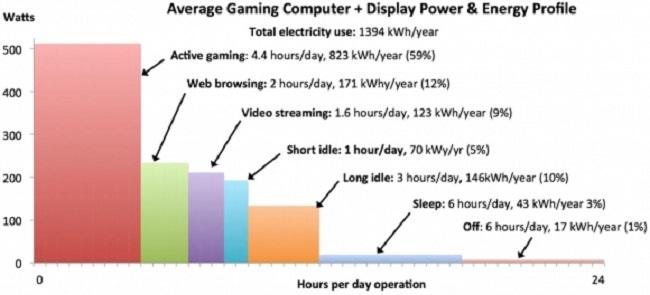
The total power draw varies dramatically. A basic office desktop might sip around 60-150 watts. A high-end gaming rig or workstation, however, could easily consume 400-800 watts, or more, under heavy load. To put that into perspective, an old incandescent light bulb might use 60 watts, and a modern LED bulb just 10. Imagine several light bulbs constantly running in your computer! Over time, these watts translate into kilowatt-hours (kWh) on your electricity bill. Even a seemingly small draw, multiplied by hours of daily use, can add up to a noticeable expense each month.
Must Read
Why does this matter beyond a bigger electricity bill? Firstly, for your finances! Every watt saved is money kept in your pocket. Secondly, it's about sustainability. The electricity we use often comes from power plants that generate greenhouse gases. By reducing your consumption, you're directly contributing to a healthier environment. Thirdly, efficient power use often means a cooler, quieter, and potentially longer-lasting computer, as less heat stress is put on components.
The good news? You have power over your power! Simple actions make a big difference. Utilize your operating system's power management settings to automatically put your computer to sleep or hibernate. Unplugging peripherals when not in use, shutting down your PC completely overnight, and choosing energy-efficient components when building or upgrading contribute to significant savings. Keep your computer clean from dust too, as buildup hinders cooling, forcing fans to work harder and consume more energy. By making these small, mindful adjustments, you’re not just saving a few bucks; you're becoming a smarter, more environmentally friendly tech user. So go ahead, peek under the hood (figuratively speaking!) and take charge of your desktop's energy destiny!


![Average Power Consumption by a Computer [1] | Download Scientific Diagram](https://www.researchgate.net/profile/Sonika_Saxena/publication/339842760/figure/fig1/AS:867811035475968@1583913682373/Average-Power-Consumption-by-a-Computer-1.png)