Okay, let's talk about something crucial. Something that might just change your digital life. We're diving headfirst into the world of... Low Power Mode.
The Great Escape
You know that little battery icon, right? The one that seems to mock you as it dwindles down to single digits? Well, there's a secret weapon. A digital superpower. It's called Low Power Mode!
Some people might be hesitant. They whisper about performance issues and sacrificed features. I say, poppycock! We're here to conquer battery anxiety.
iPhone Adventures
First, let's tackle the iPhone. Those sleek, shiny devices we all love (and occasionally want to chuck across the room).
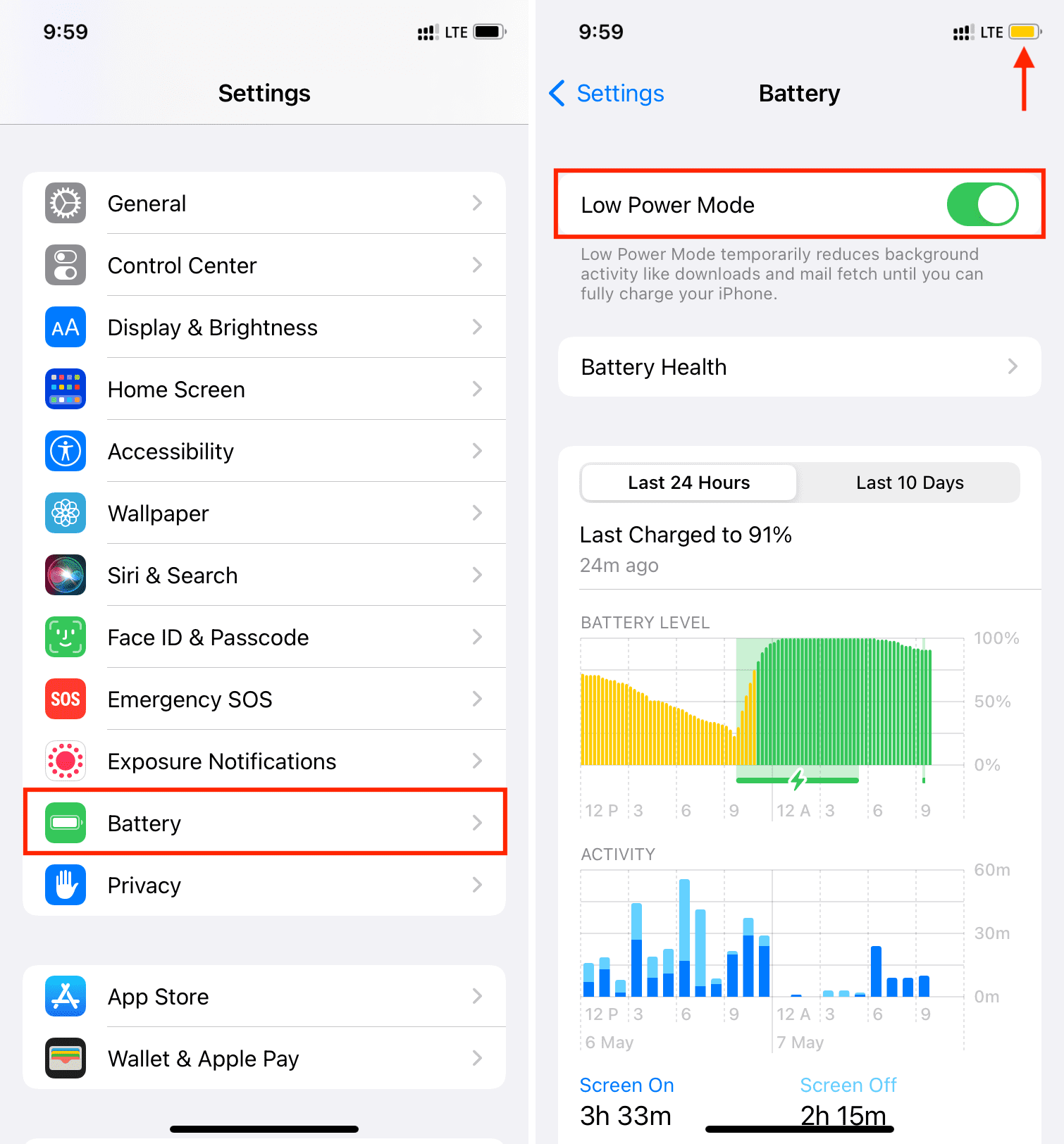
There's a super simple way to engage Low Power Mode. Head into your phone's Settings. Then, find the "Battery" section. It's usually not too hard to find.
Inside the Battery settings, you'll see the glorious "Low Power Mode" switch. Flip it! Feel the power!
See that yellow battery icon? That's your badge of honor. Wear it proudly! You're saving the planet... or at least a few precious percentages.
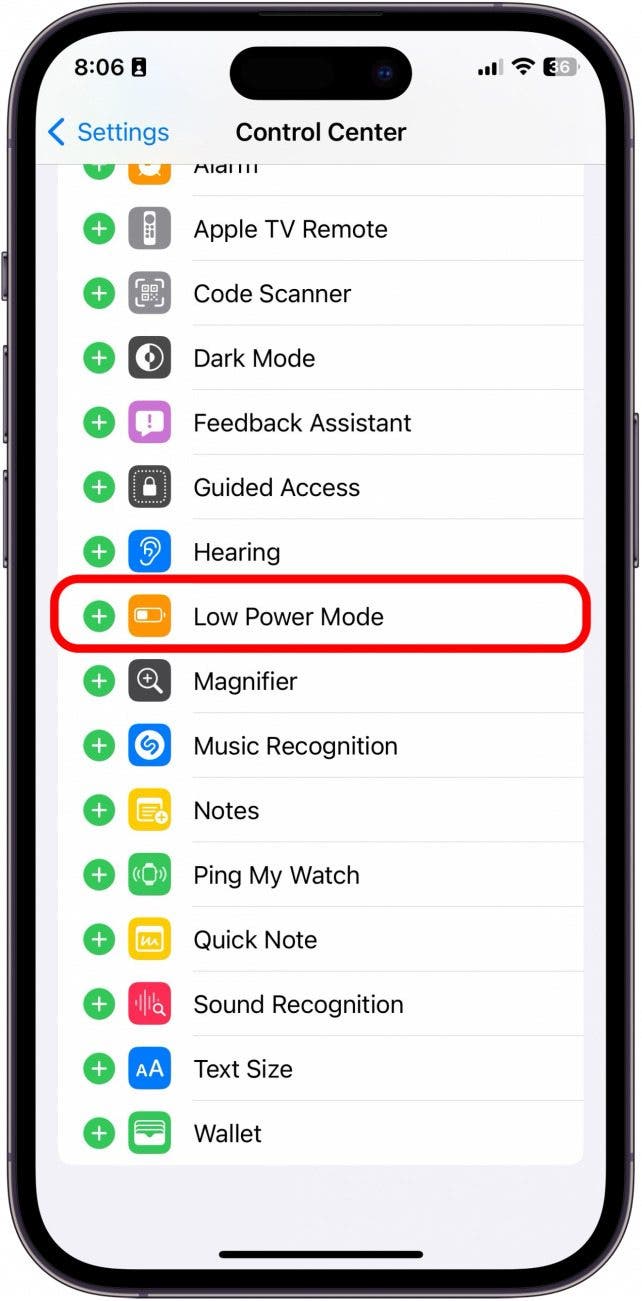
But wait, there's more! Did you know you can add a Low Power Mode button to your Control Center? Swipe down from the top-right corner of your screen.
Then, go to Settings, Control Center, and customize. Add Low Power Mode and you can activate it with a tap.
Android Antics
Android users, fear not! You too can join the Low Power Mode revolution.
The exact steps might vary slightly depending on your phone's brand and Android version. But generally, you're looking for the "Battery" settings.
It's often in the main Settings menu. Sometimes it's under "Device Care" or something similar. Hunt around. You'll find it.
Once you're in the Battery settings, look for terms like "Power Saving Mode," "Battery Saver," or "Adaptive Battery." These are all variations on the same theme.
Toggle it on. Bask in the glory of extended battery life!
Many Android phones also let you customize your power saving settings. You can choose to limit background activity, restrict data usage, and even lower your screen brightness.
The Unpopular Opinion: Embrace the Yellow!
Here's where I might lose some of you. I'm about to say something controversial. I often keep my phone in Low Power Mode... all the time.
Yes, you read that right. Always. On. That's my default state. This is my controversial statement.
I know, I know. Some of you are gasping. You're worried about performance. You're thinking about all the things you'll miss.
But honestly, I haven't noticed a huge difference in my day-to-day use. My apps still work. I can still browse the internet. I can still doomscroll through social media.
And the best part? My battery lasts way longer. I'm talking, like, significantly longer. It's a game-changer.
Think of it as a preventative measure. It is not like waiting until you're on 10% to freak out and scramble for an outlet. You're playing the long game.
I see my friends constantly tethered to their chargers. They're always searching for an outlet like it's the Holy Grail. I just smile smugly and keep scrolling.
Maybe I'm missing out on some super-advanced features. Maybe my phone isn't running at its absolute peak performance. But I'm okay with that.
I prioritize battery life. I value the freedom of knowing I can leave the house without worrying about my phone dying halfway through the day.
I've become a master of extending the usability of my electronic devices. You can be too.
But Seriously, When *Should* You Use It?
Okay, okay, maybe I'm being a little extreme. I will admit there are times when Low Power Mode is particularly useful.
Traveling is a prime example. When you're on the go, you might not have access to a charger. Low Power Mode can be a lifesaver.
It is also useful during long meetings or conferences. Anywhere you might be stuck without access to power for an extended period.
Or, you know, anytime your battery is getting low and you need to squeeze every last drop of juice out of it.
It’s perfect when you're expecting an important call. Low Power Mode helps ensure your phone stays alive long enough to receive it.
Basically, use it whenever you want to conserve battery life. There's no shame in it. Embrace the power of efficiency!
Beyond the Basics
Low Power Mode is a great start, but there are other things you can do to extend your battery life. These are some pro-tips.
Lower your screen brightness. This is a big one. A bright screen sucks up a ton of power. Dim it down to a comfortable level.
Turn off background app refresh. Many apps are constantly updating in the background, even when you're not using them. Disable this feature to save battery.
Disable location services for apps that don't need them. Some apps are constantly tracking your location, even when you don't want them to. Limit access to location services to apps that actually need it.
Turn off Bluetooth when you're not using it. Bluetooth can drain your battery, even when you're not connected to anything. Turn it off when you don't need it.
Close apps you're not using. Apps running in the background can drain your battery. Close them when you're finished with them. Force quit them if they seem to be misbehaving.
Update your phone's software. Software updates often include battery optimizations. Make sure you're running the latest version of your operating system.
And finally, consider investing in a portable charger. This is a great way to ensure you always have power on the go.
The Conclusion (of Sorts)
So there you have it. My slightly unhinged, potentially controversial guide to Low Power Mode. I believe that this is worth it.
Whether you embrace it as your default state like I do, or you only use it in emergencies, it's a valuable tool to have in your digital arsenal.
Experiment with it. See what works for you. Don't be afraid to embrace the yellow battery icon.
Because, at the end of the day, a dead phone is a useless phone. And nobody wants that, do they?
Now go forth and conquer your battery anxiety! May your phones live long and prosper! And may you never be caught without power again!
Consider this permission to enter Low Power Mode without shame.

:max_bytes(150000):strip_icc()/001_extend-iphone-battery-life-low-power-mode-1999581-5a5bb764b6fc437688a79de2949267a3.jpg)