Ever wondered if your trusty hard drive is secretly guzzling electricity like a tiny, spinning power hog? Probably not. But hey, understanding how much power your computer's components consume is surprisingly interesting, and even useful. Whether you're building a super-efficient PC, trying to extend your laptop's battery life, or just curious about the inner workings of your tech, knowing your hard drive's power draw is a great starting point.
So, why bother thinking about hard drive power consumption? Well, for a few reasons! First, it directly impacts your electricity bill. While a single hard drive might not seem like much, multiply that by multiple drives in a server room or a high-performance gaming rig, and the numbers start to add up. Second, power consumption translates to heat. Excessive heat can reduce the lifespan of your components and even lead to system instability. Keeping things cool and efficient is a win-win. Finally, for laptop users, understanding power usage is crucial for maximizing battery life. Every little bit helps!
Let's dive into the specifics. Hard drive power consumption isn't a fixed number; it varies depending on the type of drive, its size, and what it's doing. Generally, you'll find two main types of hard drives: HDDs (Hard Disk Drives) and SSDs (Solid State Drives).
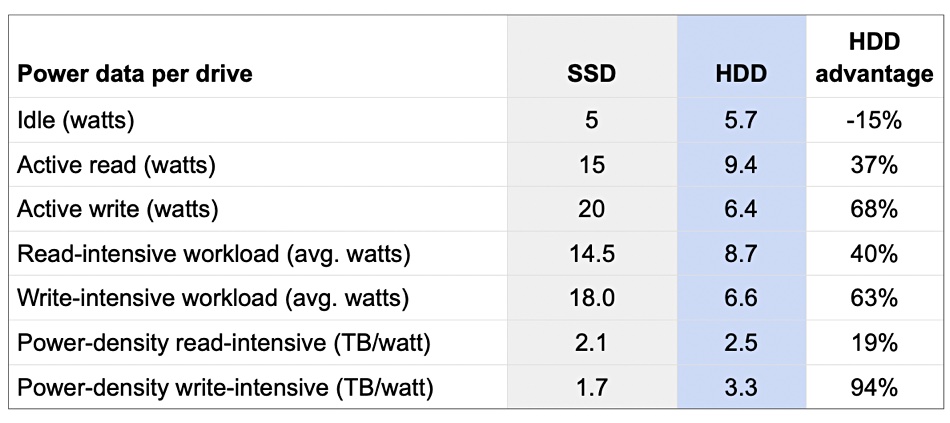
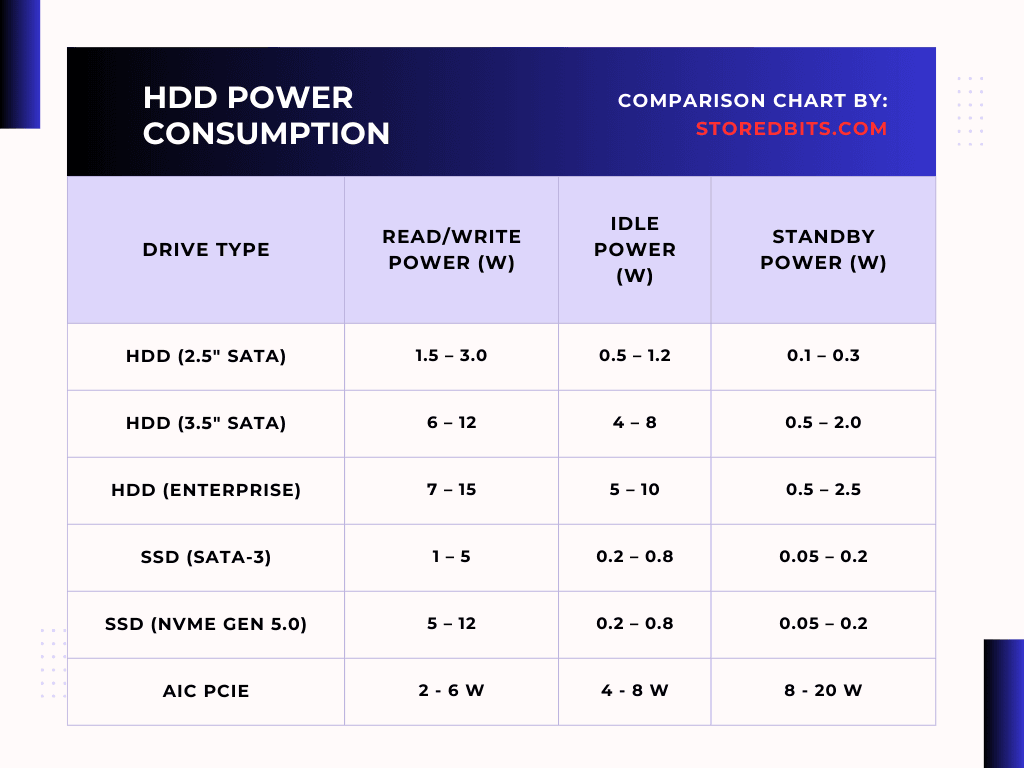
HDDs, the older technology, use spinning platters and a read/write head to access data. Because they involve moving parts, they tend to consume more power, especially during startup and when actively reading or writing data. A typical 3.5-inch HDD might draw anywhere from 5 to 15 watts when active, and a few watts when idle. Laptop HDDs (2.5-inch) are generally more power-efficient, but still consume more than SSDs.
SSDs, on the other hand, are flash-based storage devices with no moving parts. This makes them significantly faster and more energy-efficient. An SSD might only draw 2 to 5 watts when active and even less when idle. This difference in power consumption can make a noticeable impact on laptop battery life and overall system energy usage.
Factors like the drive's capacity, speed (RPM for HDDs), and manufacturer also play a role. Higher capacity drives or faster RPM drives usually consume more power. So, how do you find out the exact power consumption of your specific hard drive? Check the manufacturer's specifications. This information is usually available on the drive's label, the product box, or the manufacturer's website. Look for terms like "typical power consumption" or "active power consumption."
In conclusion, while your hard drive might not be the biggest power hog in your system, understanding its energy consumption is important for building efficient and long-lasting computers. Choosing an SSD over an HDD, when possible, can save energy and improve performance. So next time you're upgrading your storage, keep power consumption in mind – your wallet (and the environment) will thank you!