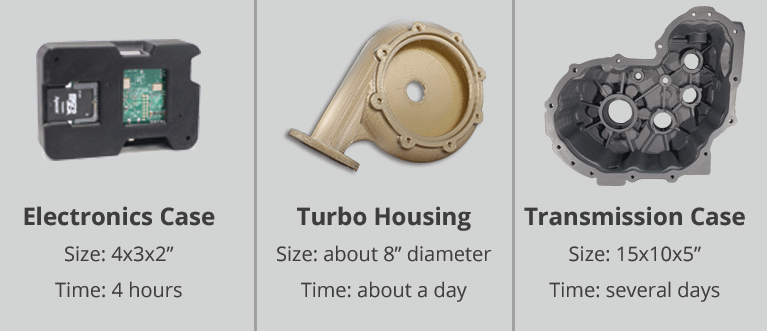
So, you've caught the 3D printing bug. Welcome to the club! Maybe you're dreaming of crafting custom phone cases, intricate miniatures for your D&D campaign, or even prototyping the next million-dollar invention. But before you hit "print," there's a burning question: How long is this gonna take?
The truth? It's like asking "How long is a piece of string?" The answer is delightfully, frustratingly, it depends. But fear not, intrepid maker! We're here to unravel the mysteries of 3D printing time and give you the inside scoop on speeding things up.
The Big Picture: Factors Affecting Print Time
Think of 3D printing like baking a cake. A simple cupcake will bake faster than a multi-layered masterpiece, right? Similarly, several factors influence how long your print will take.
- Object Size and Complexity: This is the most obvious one. A tiny figurine will print much faster than a life-sized Iron Man helmet (though who are we kidding, we all secretly want to print that helmet). Intricate designs with lots of fine details also add time.
- Layer Height: The thinner each layer of plastic, the smoother the final product, but the longer the print. Think of it like painting a wall: more coats equal a better finish, but more time invested.
- Print Speed: Yes, you can crank up the speed! But be warned: going too fast can lead to messy prints with poor quality. It's a balancing act between speed and precision.
- Infill Density: Infill is the internal structure of your print. A higher density means a stronger object, but also a much longer print time. For decorative items, you can often get away with a lower density.
- Material: Different materials have different printing characteristics. PLA, a common and beginner-friendly material, generally prints faster than more exotic materials like ABS or nylon.
- Printer Type and Settings: Your specific 3D printer and its software settings play a crucial role. A well-tuned printer will generally be faster and more reliable.
Decoding the Time Estimate
Most 3D printing software (also known as "slicers") will give you an estimated print time. This is a good starting point, but don't treat it as gospel. It's often optimistic. Consider it more of a "best-case scenario."
Pro Tip: Add some buffer time to the estimate. A 10-20% cushion is usually a good idea, especially for longer prints. You don't want to be waiting impatiently, only to discover the print is still going strong (or worse, failed near the end!).
Speeding Things Up (Without Sacrificing Quality)
Okay, so you're impatient (join the club!). Here are some tips to shave time off your prints without ending up with a melted mess:
- Optimize Layer Height: Find the sweet spot between speed and quality. Experiment with different layer heights to see what works best for your specific object and printer.
- Adjust Infill: Don't overdo the infill! Unless you need a super-strong object, a lower infill density will significantly reduce print time.
- Upgrade Your Nozzle: A larger nozzle can extrude more plastic per second, speeding up the printing process.
- Print Multiple Objects Simultaneously: If you have a large print bed, try printing multiple objects at once. Just be aware that if one object fails, it could affect the others.
- Invest in a Faster Printer: This is the most obvious (and potentially expensive) solution. Newer printers often boast faster printing speeds and improved technology.
Cultural Connection: From Instant Gratification to Patient Craftsmanship
We live in a world of instant downloads and overnight shipping. But 3D printing reminds us of the value of patience and craftsmanship. It's a process that requires careful planning, attention to detail, and a willingness to accept that things might not always go according to plan. Just like the meticulous artisans of the past, 3D printing allows us to create unique and personalized objects with our own hands (or at least, with the help of a robot!).
Think about a potter carefully shaping clay on a wheel, or a weaver painstakingly creating intricate patterns on a loom. 3D printing, in its own way, is a modern extension of these ancient traditions.
Fun Fact: The Longest 3D Print Ever?
While pinpointing *the* longest 3D print is tricky (and often depends on the definition), some architectural projects have taken weeks or even months to complete! We're talking entire houses and buildings being 3D-printed. Talk about a long wait time!
Wrapping Up: Patience is a Virtue (Especially in 3D Printing)
So, how long does it take to print in 3D? The answer is always, "it depends." But by understanding the factors that influence print time and experimenting with different settings, you can optimize your workflow and bring your creative visions to life. And remember, sometimes the best things are worth waiting for.
The next time you find yourself tapping your foot impatiently while your 3D printer hums away, remember the bigger picture. Think about the skill and technology involved, and appreciate the opportunity to create something unique and tangible. Maybe use the wait time to learn a new skill, read a book, or simply enjoy the present moment. After all, life's too short to rush through everything – even 3D printing.